Codesign Dispatch

Pubblicato Di Yelling Mikerti
- StatoDisponibile
- TipoNuovo
Small UI
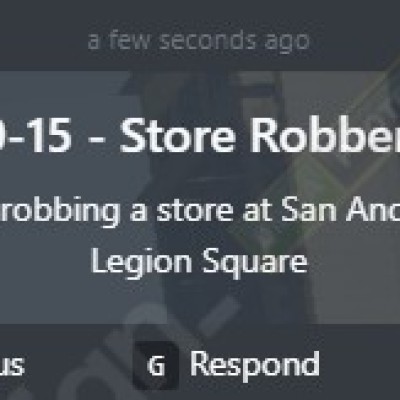
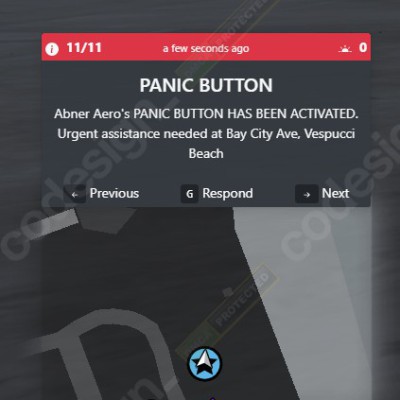
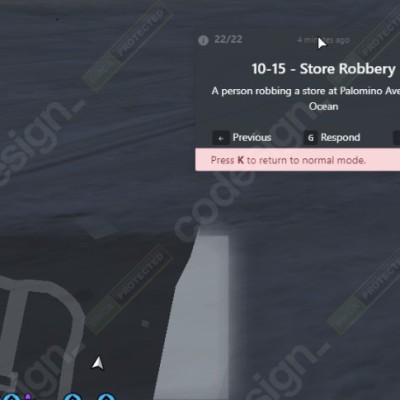
This UI can be moved and placed wherever the player wants, so it will never interfere with other UI items. It displays the next information:
Total number of calls
People responding to the call
Notification title & notification message
Info on how to navigate the small UI and respond
Quick respond and set a waypoint to calls
Distance away from the ca
Large UI
The large UI displays more information that can be useful for players such as:
Full zoomable GTA map with day/night cycles
List of all received calls
Player's blips & call blips
Player's names when hovering over blips
Player's radio channels
Option to set the auto-delete timer of notifications
Option to set your status, callsign and vehicle type
Panic button which flashes when you receive a panic call
Dispatcher mode
Quick join radio channels
Set a waypoint to a users location
Name and callsign of units responding to calls
Features
DISPATCHER MODE: When a call is initially received, only the dispatcher can see the call. Dispatchers can enable voice mode while the large UI is enabled to communicate over the radio to other officers to see who is available to take calls (the large ui can stay enabled the whole time and everything will be instantly updated on the UI). Dispatchers then can drag and drop a unit (single unit or grouped unit) onto the call and only that unit will receive the call. If no dispatcher is logged in, the dispatch will function exactly like it currently does in previous versions, where all online officers will receive the calls.
Multi-job compatibility: You can configure it so multiple jobs can see each other on the large UI and pause menu blips. So for example, if you have 2 police jobs (police and sheriff) or (police and ambulance), they will be able to see each other on the maps.
Large map zoom: On the large UI map you can now zoom in and out and move around with the mouse.
Grouped units: On the large UI, if 2(or more) officers are patrolling together, they can create a group, which will show the other officers that they are patrolling together.
Vehicle type status: The vehicle type icon on the large UI units list will change depending on what vehicle type a player has set in the settings.
Player status: The player's status on the large UI's units list will be visible when you right-click a player's name on the unit list. Also, the background of the radio channel is a quick way of viewing a player's status as it will change colour when a player changes their status. You can configure add/remove/change statuses in the config, along with the colour of each status.
Quick join/leave radio channels: On the large UI, you can right-click a player's name on the units list and have the option to join their radio channel or leave your radio channel.
Pause menu/mini-map player blips: We have added a built-in player blips system, which works on OneSync (legacy+infinity)/non-OneSync. Your blip icon will change depending on what you have set your vehicle type to on the large UI settings. When your vehicle's emergency lights are on your player blip will flash (flashing colours are configurable for each job). Your current radio channel will also be displayed on your player blip. Everything is fully synced across all players. View preview here.
Built-in Police alerts: This dispatch includes 3 basic built-in police alerts: stolen car, gunshots and speed cameras. You can require a witness (NPC/ped) to be nearby to notify the police. If you use cd_radar BOLOs will be added automatically if the player is in a vehicle when committing the crime.
View responding units: On the large UI, you can click on a notification and see which units are responding. It will show their name, callsign, how long ago they clicked respond etc.
Set GPS location: On the large UI, you can right-click a player's name on the units list and it will set a waypoint to this player's location on the pause menu/mini-map.
Live Map: Added the ability to enable the player blips on the large UI to auto-refresh while the UI is open.
Built-in Job Calls: When a civilian uses job call commands such as /911, a notification will be sent to the police. You can configure multiple jobs to use this system. After receiving a job call, players in said job can respond to the civilian using the /reply chat command. Calls can also be anonymous (it does not show the caller's name or phone number and uses radius blips).
Radius Blips: If you don't want to give the police an exact location, you can use a radius blip, which will randomize the centre of the blip and highlight a large area on the pause menu map/mini-map.
Dependencies and Compatibility
Framework Dependencies
Auto Detect Framework: This feature automatically identifies your framework and applies the appropriate default settings.
Framework Compatibility Notes
ESX ✔️ drag-and-drop compatible Supports esx 1.1, 1.2, 1.final, extendedmode and all legacy versions.
QBCore ✔️ drag-and-drop compatible
Supports the official QBCore only.
vRP ❌ not compatible
No-framework ❌ not compatible
Other (custom framework)
⛔ major changes required
Framework functions etc need changing.
SQL Resource Dependencies
Auto Detect SQL Resource: This feature automatically identifies your SQL resource and applies the appropriate default settings.
Auto Insert SQL Queries: This feature automatically inserts all SQL queries into your database.
SQL Resource Compatibility Notes
mysql-async ✔️ drag-and-drop compatible
ghmattimysql ✔️ drag-and-drop compatible
oxmysql ✔️ drag-and-drop compatible
Resource Dependencies
Resource Compatibility Notes
None N/A No resource dependencies.
Locales/Translations
Locale Type Translatable Notes
UI ✔️
Notifications ✔️
OneSync Compatibility
State Compatibility Notes
Infinity ✔️
Legacy ✔️
Disabled ✔️